


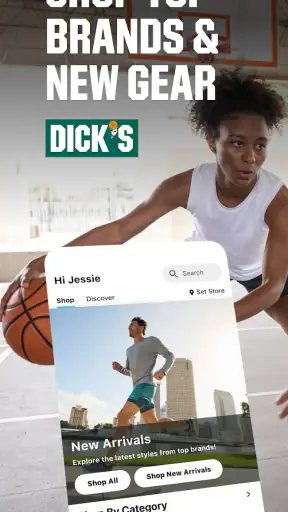
I like shopping apps most when they solve a specific problem instead of simply putting a store page on a phone. DICK’S Sporting Goods is at its best in that role: it gives me a focused way to browse sportswear, equipment, apparel, and footwear from DICK’S Sporting Goods without having to begin with a general web search. The app is free, aimed at everyone, and developed by DICK'S Sporting Goods, so its main strength is the direct connection between the retailer’s catalog and the shopping experience.
The capability I noticed most is the way the app brings a broad sports-shopping catalog into one place while still letting me narrow my search around a particular activity, brand, or type of product. That matters when I know I need running shoes, a basketball, training clothes, or a replacement piece of equipment but do not yet know the exact item. Instead of wandering through unrelated online stores, I can start with the sport or product area that fits my need and work toward a shorter list.
That sounds simple, but it changes how useful the app feels. A general shopping marketplace may offer more sellers, while a brand-specific app may offer a narrower selection. This one sits between those options. It is a dedicated sports retailer app, and that focus makes it more practical for people who want several sports-related items in the same shopping session.
Focused sports shopping instead of a general marketplace
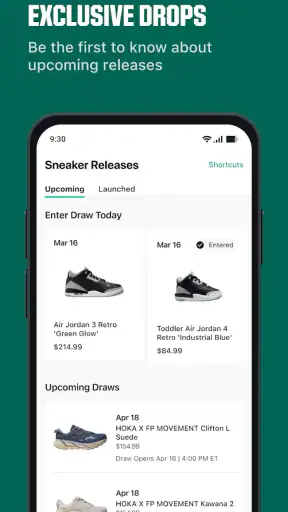
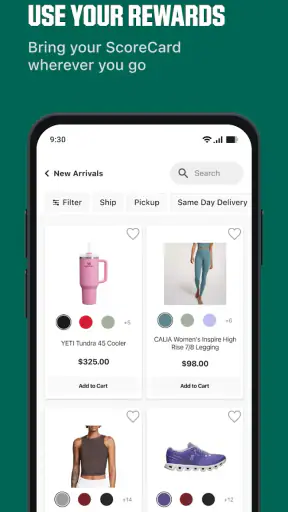
The app’s store summary points to sportswear, apparel, and exclusive sneakers, with familiar names such as Nike, Adidas, and New Balance included in the shopping mix. In my experience, that makes it more useful for comparison shopping within a sports category than a basic fashion app. I can think about the activity first, then compare styles and brands that make sense for it.
The real advantage is category focus: I am not using a general marketplace and hoping its search understands the difference between a training shoe, a running shoe, and a casual sneaker. A sports retailer’s catalog gives the search a more relevant starting point. That is especially helpful when I am buying for a season, a team activity, a fitness routine, or a specific outdoor plan.
I would not describe the app as a replacement for every kind of shopping. If I want handmade goods, secondhand bargains, or the widest possible selection from independent sellers, a marketplace is still a better fit. If I already know that I want one particular brand and nothing else, the manufacturer’s own app may feel more direct. DICK’S Sporting Goods makes the most sense when I want to compare sports products across several brands while staying inside one retailer.
How I use the catalog without getting lost
My preferred approach is to start with a clear purpose rather than opening the app just to browse. For example, “I need comfortable shoes for regular walking and light exercise” is more useful than “I need new shoes.” From there, I can look through relevant footwear and use the product information to decide which items deserve closer attention. The same method works for clothing: starting with training, outdoor, or team-related needs keeps the browsing session manageable.
One practical tip is to separate discovery from commitment. I first collect a small group of possible products, then compare the details that actually affect my decision: intended use, construction, fit information, color, and whether the design suits the activity. This prevents the familiar shopping mistake of choosing the first attractive item and only later realizing it is made for a different purpose.
Another useful habit is to search by the problem I am trying to solve. Instead of focusing only on a brand name, I would begin with the product type and activity, then use the brand as a second filter. That workflow is valuable in a store with many recognizable labels because it keeps the decision tied to use rather than turning the whole experience into a popularity contest.
What the experience feels like in practice
The app is built for the kind of shopping where I may already have a rough idea but still need to compare options. I can move from a broad category toward a more specific product, inspect the available choices, and decide whether an item deserves a place in my shortlist. This is less stressful than trying to search the entire internet for sports products, particularly when I am buying several things at once.
A realistic example would be preparing for a new training routine. I might need shoes, shorts, a shirt, and a water bottle. Rather than opening separate brand apps for each item, I can use one sports-focused retailer as the starting point. I still need to judge fit and product suitability carefully, but the app reduces the number of places I have to check before making that judgment.
For family shopping, the same structure can save time. A parent preparing for school sports or a child beginning a new activity can look across apparel, footwear, and equipment instead of treating every item as a separate research project. The benefit is not that the app makes the decision automatically; it is that it gives me a more relevant place to make the decision.
The app’s current version is 7.1.5, and it supports devices using operating system version 11 or later. That is worth checking before installing, especially if I am using an older phone. On a compatible device, the free price makes it easy to try without turning the installation into a financial commitment.
The best scenario: a planned sports-shopping session
The strongest use case is a planned purchase with several related needs. Imagine I am getting ready for a weekend hiking trip. I may want clothing layers, suitable footwear, and a few accessories. A general fashion retailer might help with clothing but be less useful for equipment, while a single-brand app could limit my choices. DICK’S Sporting Goods gives me a retailer-centered place to compare across sports-oriented products.
The key is to use the app as a planning tool, not just a digital aisle. I would make a short checklist before browsing, then search for each category and compare items against the same requirements. For footwear, I would prioritize intended terrain and fit. For clothing, I would think about movement and weather. For equipment, I would avoid buying based only on appearance. This approach makes the app more valuable because it turns a wide catalog into a deliberate shopping workflow.
It is also a good fit when I want to stay with one retailer for convenience. Keeping related items in one shopping journey can make it easier to review my choices before checkout. I still recommend checking the final order carefully, especially when sizes, colors, and product variations look similar. A large catalog can be helpful, but it also creates opportunities to select the wrong version if I rush.
Another strong scenario is replacing a familiar item. If I already know the type of shoe, clothing, or equipment I need, the app can help me find comparable options without starting from zero. In that situation, I can use my previous experience as the filter: what worked, what wore out, what felt uncomfortable, and what features I actually used. That is more reliable than choosing solely from images or brand recognition.
Where the convenience has limits
The same breadth that makes the app useful can create friction. More brands and product types mean more decisions, and a shopper who has not defined a purpose may end up scrolling without getting closer to an answer. I would not open it expecting the app to tell me which product is right for my body, activity level, or playing style. It can organize the shopping process, but personal judgment still matters.
Fit is the biggest limitation for me. Shoes and clothing can look perfect on a screen and still feel wrong in person. Product descriptions and images help narrow the choice, but they cannot replace trying something on when fit is critical. This is one situation where visiting a physical store or choosing a retailer with a return process that suits me may be more reassuring than relying entirely on an app.
There is also a trade-off between convenience and comparison depth. Shopping through one retailer is faster than checking many websites, but it may not show every possible alternative in the market. If my priority is finding the lowest available price everywhere, I should compare externally before completing the purchase. If my priority is reducing research time and staying within a sports-focused catalog, the app becomes more attractive.
I also think the app is less suitable for impulse browsing than it first appears. Sports products often involve practical details that are easy to overlook when I am simply looking at attractive colors or familiar logos. I would rather decide what I need first and use the app to locate it. That small change in behavior reduces the chance of buying an item that looks good but does not match the activity.
How it compares with the alternatives I normally use
Compared with a general marketplace, DICK’S Sporting Goods feels more purposeful. A broad marketplace can win on variety, seller competition, and unusual products, but its sports section may be mixed with unrelated listings. Here, the retailer’s sports identity makes the starting point clearer. I would choose the marketplace when price hunting is my main goal, and this app when relevance and a more coherent sports catalog matter more.
Compared with a manufacturer’s app, the advantage is cross-brand browsing. A Nike-only experience may be ideal when I have already decided on Nike, but it does not help much if I want to compare Nike with Adidas or New Balance. This app is better for that middle stage where I know the product category but remain open to different brands.
Compared with visiting a physical store, the app wins on convenience and early research. I can explore from home, create a shortlist, and avoid spending time walking through departments that do not apply to me. The store still wins when I need to feel fabric, test a shoe’s fit, ask a detailed question, or see an item immediately. For me, the best approach is not choosing one forever; it is using the app for research and a store visit when physical inspection is important.
Who gets the most value from it
I would recommend it most to active shoppers who buy across categories rather than staying loyal to one product line. Runners, gym users, outdoor enthusiasts, parents shopping for sports activities, and people replacing several pieces of gear can all benefit from the focused catalog. The app is especially convenient when I want to compare recognizable brands without opening a separate shopping experience for each one.
It is also useful for someone who prefers a structured purchase. If I make a checklist, compare products by purpose, and review sizes carefully, the app can shorten the path from “I need sports gear” to a sensible shortlist. The free installation makes it easy to keep available even if I only shop seasonally.
I would be more cautious about recommending it to shoppers who only care about the absolute lowest price, need specialist technical advice before buying, or want rare products outside a mainstream sports retailer’s range. Those users may get more value from price-comparison tools, specialist shops, or direct brand support. Likewise, someone who dislikes researching options may find the catalog overwhelming rather than helpful.
The app has a strong public reception, with an average rating of 4.8 from around 53 thousand ratings and more than 5 million installs. Those figures suggest that it has reached a substantial audience, but they do not remove the need to judge whether its shopping style fits me. A high rating is encouraging; it is not a substitute for checking compatibility, considering fit, and knowing what I actually need.
My verdict after using it as a shopping companion
DICK’S Sporting Goods works best when I treat its central strength seriously: it is a focused sports-shopping companion, not a universal marketplace and not a personal equipment expert. The ability to browse sportswear, apparel, footwear, and related products across well-known brands gives me a useful middle ground between a single-brand app and the disorder of a huge general marketplace.
I appreciate that it can support both a quick replacement purchase and a larger, planned shopping session. My best results come from entering with a clear activity, making a shortlist, and checking practical details before I commit. That workflow turns the app’s broad selection into an advantage instead of a distraction.
There are still good reasons to use another option: physical fitting, specialist advice, unusual products, or aggressive price comparison. But for everyday sports shopping, especially when I need to compare brands and categories in one place, I find this app genuinely useful. It is free, accessible to everyone, and maintained by the retailer itself, which makes it a sensible app to keep on a compatible phone when sports shopping is part of my regular routine.


